
Attract-Mode Layout – SDArcade v2.2
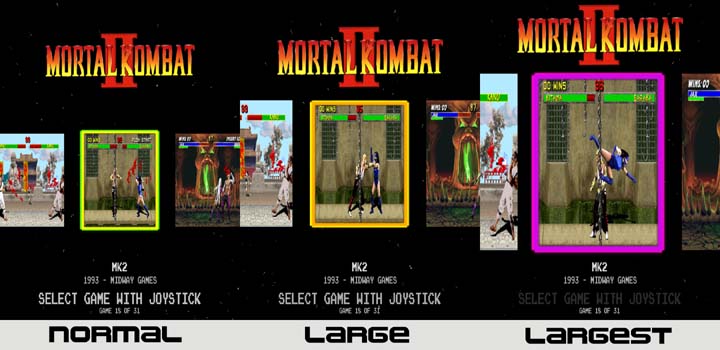 SDARCADE v2.2: The original SDARCADE theme is one of the first I used with my arcade cabinet and one I really like. It was originally created by Jedione over at the attract-mode forums who was inspired by the ArcadeSD’s front end, but it didn’t work with the Pi. Dee2er modified the theme to work with the Pi. At some point behrmr added a couple/few tweeks as well. One of the first goals of mine when I started to learn how to manipulate layouts was to add videosnap functionality to the layout. Stock, you COULD use videosnaps instead of the snapshots but it would really bog down Pi3 systems as all images in the “carrier” would show videos. My goal was to show a video… after ‘x’ seconds… but only in the center “framed” location. During my first attempt I failed miserably… but I did manage to learn how to make the snapshots larger. After some time creating other layouts and learning a bit about the language syntax, etc. I made a second attempt at implementing video snaps… after asking around a bit and getting help on the Attract-Mode forums I managed to succeed. Next I figured I could squeeze out more room for an even larger preview carrier and after doing so I started playing around with the animation module. The result is what you see here… which I will still call a “BETA” as there are a couple animation options that just don’t work exactly right (they are marked BETA). These two animation options both have an animation for the logo of the new game being selected appearing… while the logo of the old game you just came from disappears. What I’ve managed to accomplish DOES WORK, but two images appear on screen until you move left/right once then you’re golden. I tried everything to get this work properly from the start (no two image issue) but failed miserably…. but I’m sure I’ll come up with a solution at some point. Until then, just consider them “bonus” animations. You will also notice that the bezel option doesn’t work great with the LARGEST preview setting as the bezel cuts off part of the logo above, etc… I figured if you’re using the LARGEST preview option, you’re not going to want the simulated bezel anyway.
UPDATE: I was recently made aware that this layout was not working properly with a PC… the ARpiCADE worked. I’ve fixed the layout and it should now work properly whether you use a PC or ARpiCADE.
You can download the layout HERE.


Fantastic AM layout! I’ve been running SDArcade on my cabinet ever since I upgraded from my old ArcadeSD hardware a couple years ago to an ARPiCADE. I was always fond of the ArcadeSD interface, and I was thrilled to find a way to carry it over virtually unchanged to my new setup. If you’re open to making additional mods to this layout, I have a small feature request… I run both vertical and horizontal-aspect games in 480p on my vertically oriented monitor, and the previews for horizontal-aspect games automatically stretch to fit the frame in vertical mode, distorting them somewhat.… Read more »
I’ve noticed that SOME videos specific formats do not work with the Pi… though I am not sure which. I’ve seen some MP4 files that worked … and some that did not… the ones I download that have all worked have come from http://www.emumovies.com.
Hi, love the layout. I have loaded it on to a pi. The video’s are not showing. I have placed them in the snap folder. The file type is mp4 is that ok ? cheers Phil
Superb – thank you -from richyrich from over on Attractmode 🙂